

Pay-as-you-go is increasingly the model through which Microsoft cloud services are licensed. The rise of agentic AI scenarios that are not about per-seat licenses but rather the consumption of capacity means that Microsoft cannot only sell all-you-can-eat style plans. Because unlike with regular Office apps, it’s possible for users to eat far too much from the buffet table if left unguarded.
Power Platform licensing initially followed the familiar per-user model of prepaid seats, just like Dynamics 365 or Microsoft 365 do. In 2021, a pay-as-you-go model was introduced. The primary driver behind this was to encourage customers to leverage the rising low-code application platform capabilities for in-house developed apps and automations, without having to commit to annual plans with predefined license counts.
Consuming premium features from Power Apps and Power Automate, as well as platform services like Dataverse, is naturally cheaper if you choose the prepaid licensing model. It remains the primary mechanism through which Microsoft wants customers to purchase these products. Yet especially now with Copilot Credits introduced as the mechanism to pay for Copilot Studio agent usage, PAYG configuration for Power Platform environments is becoming more and more popular for customers.
How capacity allocation impacts your pay-as-you-go bill
Microsoft’s own documentation for the pay-as-you-go plan is fairly detailed, yet not fully up-to-date with new terminology and features introduced alongside the Copilot Studio offering development. One especially useful capability for Power Platform licensing management that launched at the end of 2024 has not been widely advertised: environment-level capacity allocation.
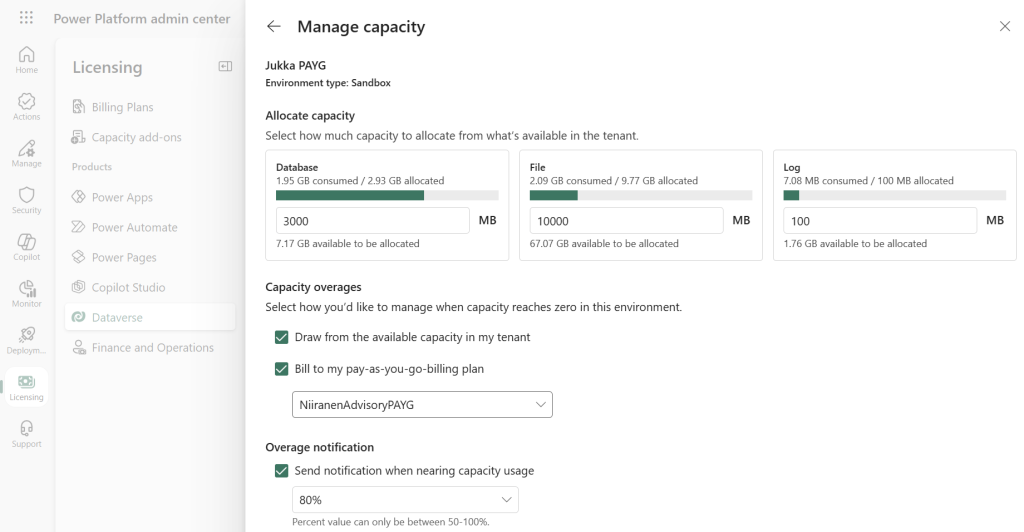
For any paid Power Platform environment that consumes Dataverse capacity, it is possible to define the amount of database, file and log capacity to be allocated. While this isn’t a hard limit, it allows configuring an overage notification to be sent when an environment is nearing its maximum allowed capacity.
How this links to the pay-as-you-go model is that Microsoft allows the customer to define an option to automatically “bill to my pay-as-you-go billing plan” once the environment exceeds its allocated capacity. It is therefore possible to use the prepaid Dataverse entitlement for normal usage of the Power Platform environment, and only resort to Azure subscription-based billing if the size of the environment grows unexpectedly.
How about the other way around? It turns out that this is indeed possible! If you have available prepaid Dataverse capacity in your tenant, there’s no reason to pay the PAYG rate of $48 per GB per month for your Power Platform environments that leverage some pay-as-you-go features. This means you can, for example, use Copilot Studio agents with Copilot Credit-based billing or offer Power Apps Per App usage option for apps – all while avoiding paying extra for the Dataverse storage of that environment.
However, when you go and create a billing plan in Power Platform admin center, it initially looks like Dataverse cannot be excluded from the products covered by PAYG. The tick box to unselect Dataverse is disabled. It’s natural for customers to assume at this stage that they simply have to pay for Dataverse capacity the same way as for the usage of other products like Power Pages, Power Apps, or Copilot Studio.

This isn’t something that is clearly illustrated in Microsoft’s own documentation, yet the information is there if you know what to look for. The key part in the Microsoft Learn documentation is this PAYG FAQ question: “How is Dataverse capacity calculated when one environment uses pay-as-you-go, and the other environment within my tenant doesn’t?”
When an environment uses the pay-as-you-go plan and is linked to an Azure subscription, any storage consumption exceeding the allocated capacity is billed to Azure. If no capacity is allocated to the environment, all storage consumption is billed directly to Azure. For pay-as-you-go environments, the first 1 GB of Dataverse database storage and 1 GB of file storage are included at no charge.
That “if” is the important bit. We need to proactively configure the storage allocation settings for the environment, before enabling it for PAYG via a billing plan in the Power Platform admin center.
Savings in action: moving storage bill from Azure to tenant capacity
To illustrate what you can expect to see after changing how your Dataverse consumption is billed, let’s look at an example tenant with one Power Platform environment that has been using the default PAYG configuration. We’ll open the Manage Capacity page for our example environment from PPAC and tick the box under capacity overages: “draw from the available capacity in my tenant”.
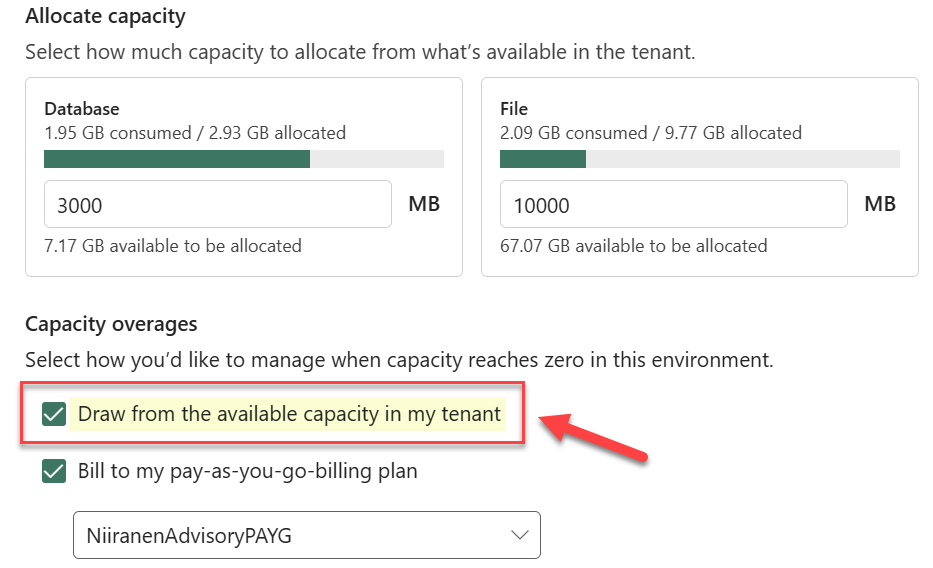
After enabling this setting, all Dataverse database storage usage above 1 GB and below the maximum capacity allocation set for this environment will no longer be charged on the Azure subscription of the environment’s billing plan. It will instead come from the tenant-level capacity pool.
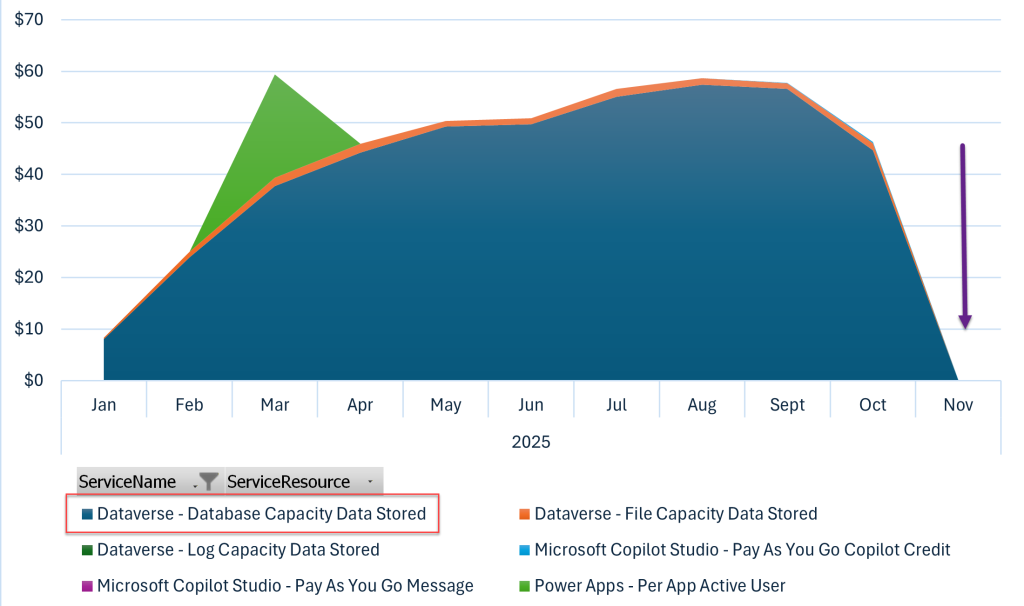
We can validate the impact by looking at the Azure usage data and filtering it to the Power Platform specific Service Name values. In this demo tenant, the monthly Power Platform PAYG bill dropped from over $50 to practically zero as a result of this one change:
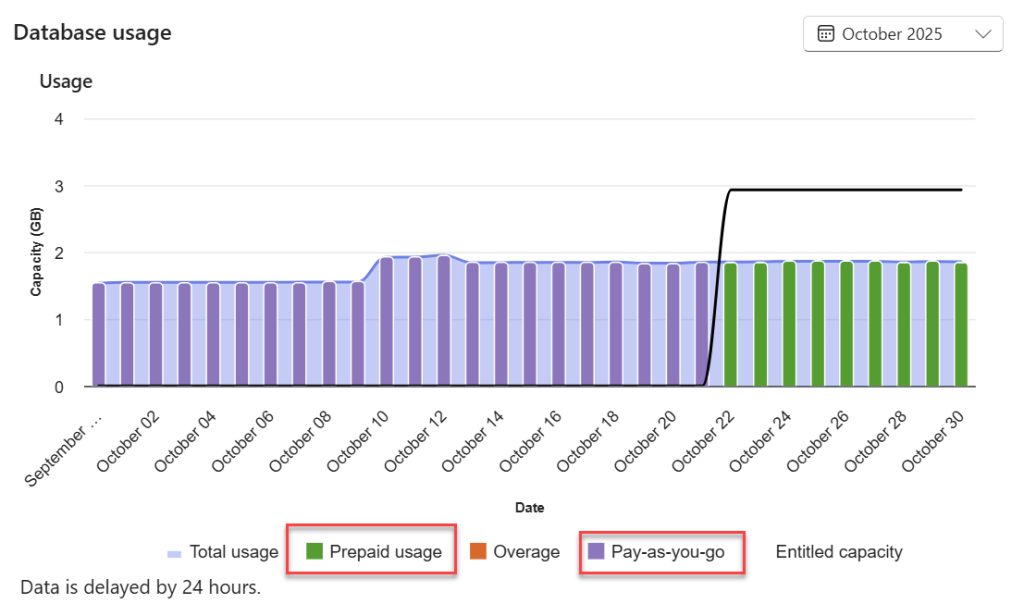
On the environment-level database usage chart in PPAC, we see how the resource consumption switched from pay-as-you-go to prepaid overnight. In addition, we see how the storage capacity allocated to this specific environment is illustrated with the black line above the daily bars. This ensures us that there is sufficient headroom in the environment to grow before the overage gets billed via Azure credits again.
Conclusions
Capabilities like the pay-as-you-go billing option for Power Platform have evolved over many years. The recent commercial push from Microsoft for new agentic services means that understanding the detailed elements of the operating environment of your Copilot Studio agents becomes a crucial skill in operational cost management. Elements like Copilot Credits are not the only factor that you must take into consideration when choosing the PAYG path.
Everything that is built on the Copilot Studio full experience lives inside a Power Platform environment. Understanding the distinction between the different Copilot Studio experiences and how their licensing model works requires keeping up with the latest product naming policies, as well as understanding which licensing documentation to reference in different scenarios. If you need assistance in solving these complex licensing puzzles, reach out to an expert for advice.