

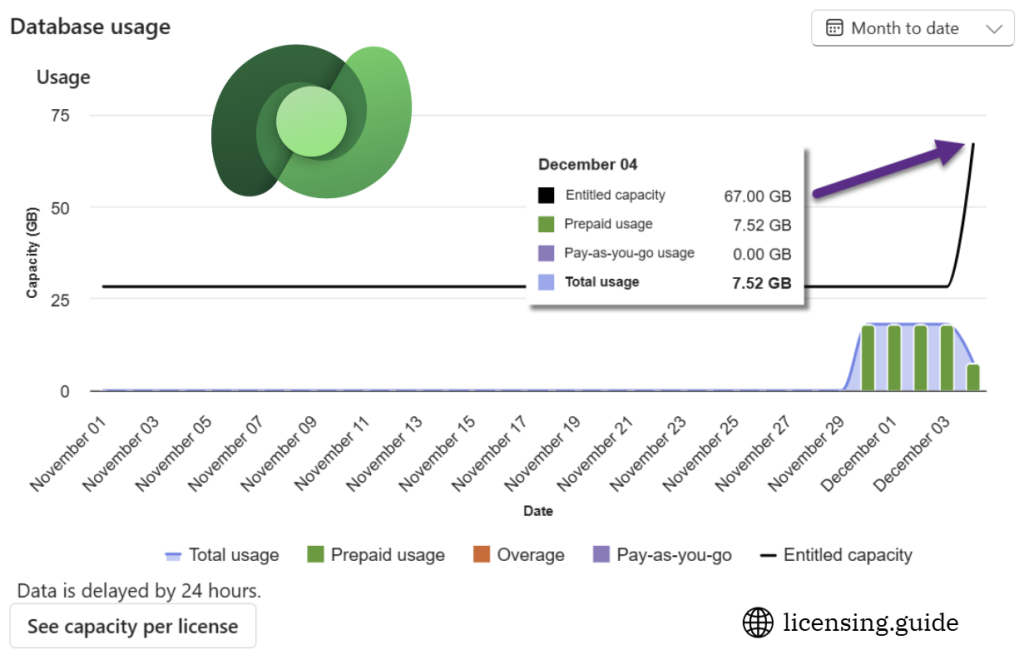
In an earlier blog post, I wrote about the addition that Microsoft had made to the Power Platform licensing guide in November 2025. In December 2025, all the licensing guides and decks have now been updated to reflect new terms of how customers get Dataverse default storage capacity with their license purchases. The updates begun rolling out on December 4th, as can be seen in this example tenant:
[UPDATE] There is now also a blog post from Microsoft announcing this change: Flexible Dataverse capacity for apps and agents.
Summary of changes
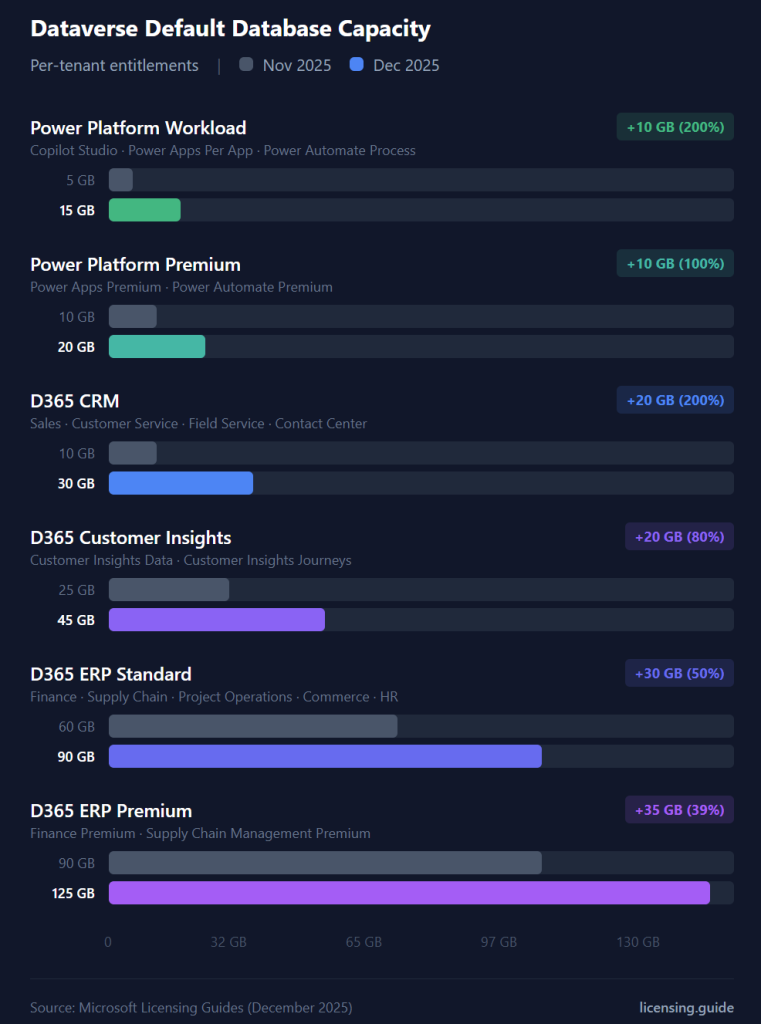
In short: everyone gets more. The Dataverse default database storage capacity has grown for basically every product, between 10 GB to 35 GB. Here’s the impact, depending on what was your starting tier:
- Copilot Studio, Power Apps Per App, Power Automate Process: from 5 GB to 15 GB
- Power Apps Premium, Power Automate Premium: from 10 GB to 20 GB
- Dynamics 365 CRM product (Sales, Customer Service, Field Service, Contact Center): from 10 GB to 30 GB
- Dynamics 365 Customer Insights: from 25 GB to 45 GB
- Dynamics 365 ERP standard (Finance, SCM, Project Operations, Commerce, HR): from 60 GB to 90 GB
- Dynamics 365 ERP premium (Finance Premium, SCM Premium): from 90 GB to 125 GB
File storage capacity has also doubled for most these products. Given the relative price points of add-on capacity ($40/GB for database in Tier 1, $2/GB for file), the cost impact is far less significant on that front. Dataverse log storage capacity has not been touched.
Here is a visualization of how the database capacity has grown for each product category compared to November 2025:
How “Default capacity” actually works
The logic of how Dataverse default capacity is allocated hasn’t changed. The text in the licensing guide remains the same:
The first Power Apps, Power Automate, Power Pages, Copilot Studio or select Dynamics 365 subscription
provides the one-time default capacity entitlement for the tenant.
This means that you don’t get an additional 20 GB if you purchase a Power Apps Premium license, in case you only had Power Apps Per App licenses before. However, in practice your 15 GB default capacity will rise to 20 GB because the biggest capacity wins here. So, it’s not a one-time event as such, but the capacity for any given product will only ever be allocated once. If you later purchase Dynamics 365 ERP licenses, you won’t be stuck with the Power Apps level of Dataverse default capacity.
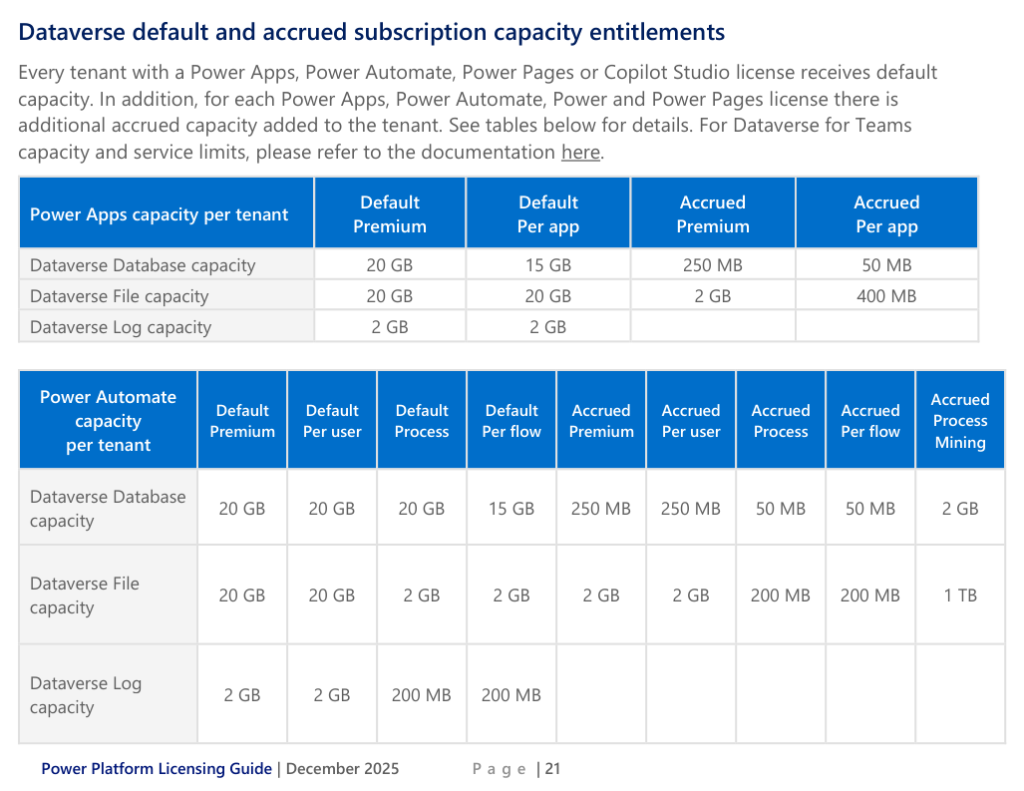
The other way to gain more Dataverse storage capacity is via the accrued capacity per each license. These may be users, flows, Power Pages user capacity packs etc. that each come with a specific amount of database and file storage per unit. No changes to these numbers appear to have been made as part of the December 2025 update.
One change that is worth paying attention to for all ERP customers is that Microsoft no longer separates Operations database and Dataverse database capacity. These now come from a single pool of storage capacity, illustrating the ongoing efforts of “One Dynamics One Platform” unification. FinOps customers and partners will surely be already familiar with what MS has been doing on the user license side, with their license assignment and enforcement updates that have seen several reporting issues and delays.
Capacity calculator
Using the December 2025 information, I have built an interactive Dataverse Capacity Calculator. It allows you to select a combination of Dynamics 365, Power Platform and Copilot Studio product user licenses and adjust their quantity. You will then see a real-time change in the total database and file capacity provided by those licenses into your Microsoft 365 tenant.
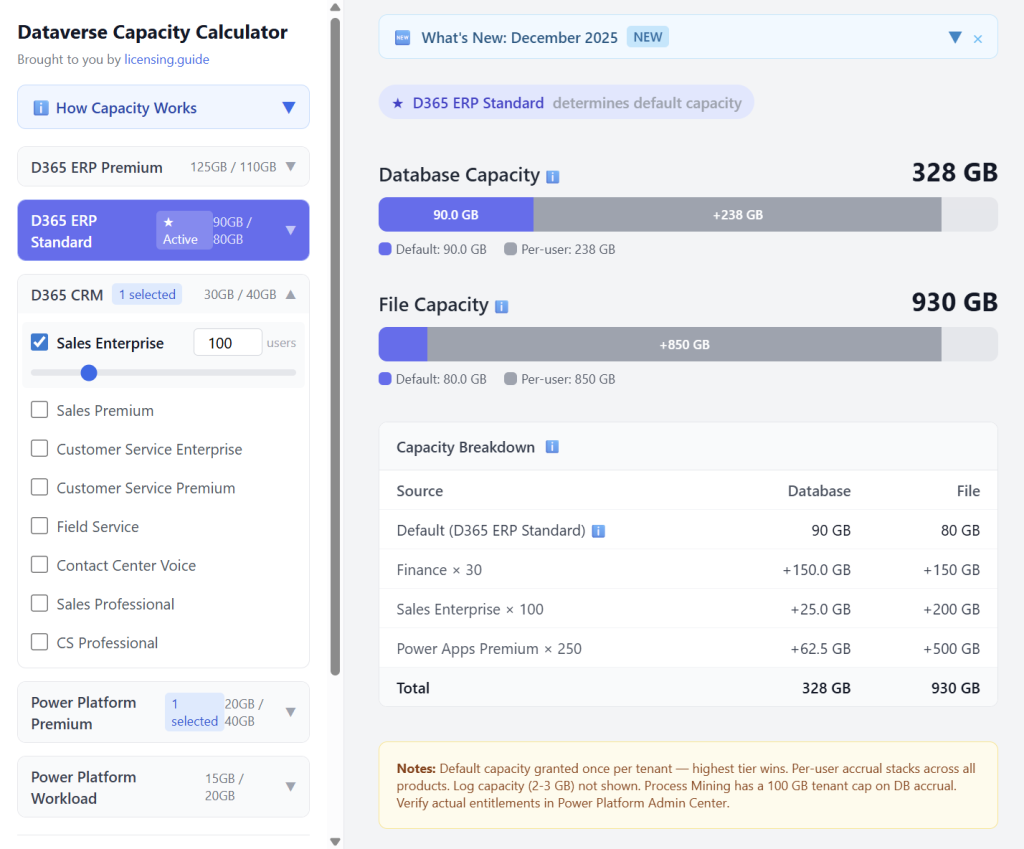
Please do note that this is an AI-assisted creation built with GitHub Copilot, using the latest Microsoft guidance as source material. The calculation formulas are not guaranteed to be entirely accurate and hallucinations are an unavoidable part of every LLM-generated work product in 2025. Details of the calculation logic may well have overlooked intricacies of the real-world licensing terms. Because let’s face it: if it really was this easy, Microsoft would surely provide similar calculators in-product…
The purpose of the Dataverse Capacity Calculator is in turning the textual information distributed by Microsoft in their PDF documents into a more engaging format that helps the readers understand the high-level principles. As stated on the front page of licensing.guide, the mission is to make sense of Microsoft licensing. This requires more than just documents and theoretical scenarios created by MS.
An interactive capacity calculator is a great example of turning complex clauses into approachable information that aids in building up real human knowledge of the software licensing world around us. AI coding agents greatly reduce the barrier of creating such tools. I want to also highlight another similar community tool, the Power Pages Licensing Cost Calculator, that has been published by Timo Rabe from PowerPortals.de.


Pingback: Top Dynamics 365 News of 2025 - Cloudproz