

When Microsoft reported the total Microsoft 365 Copilot add-on license sales to be only 15 million seats in their January 2026 earnings call, it became harder to ignore that premium AI feature adoption remains in the low single digits as a share of the Microsoft 365 base. What this means is over nine out of ten Microsoft 365 users effectively only have access to the ‘free’ Copilot Chat experience.
How much AI usage is this majority of M365 users actually entitled to? The answer to this question feels at times as well-kept a secret as the paid M365 Copilot adoption rate was during the first two years after the SKU launched. Microsoft would naturally want to maintain the position that any serious use of Copilot requires a license upgrade.
Support pages such as “How Copilot Chat works with and without a Microsoft 365 Copilot license” often do not keep up with the latest entitlements. Oversimplified explainer videos like the one on that page are even worse, due to how difficult it is to update them as the products and licensing terms evolve. For instance, the below screen that should illustrate what the premium add-on offers isn’t very useful at this point anymore.
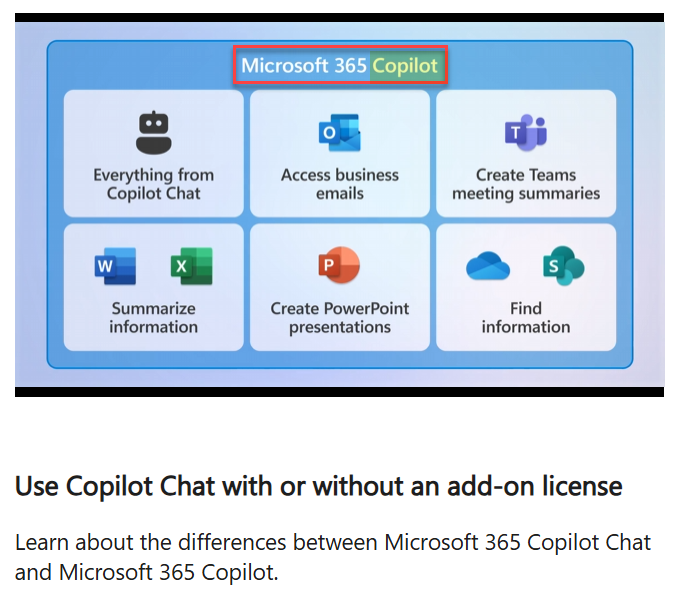
What can customers and partners do then? With no detailed official information sources existing, the state of Copilot Chat vs. Microsoft 365 Copilot features requires active investigation from community members and independent advisors willing to share their discoveries. That is why we are here today, of course.
Updated Copilot Chat Features List for April 2026
As part of other announcements (which we’ll get to later on), Microsoft released new decks for people involved in commercial customer discussions. While the material cannot be directly shared here, what we can do is ask the Claude for PowerPoint add-in to turn the factual data from those decks into a more useful format.
This is what I have done to produce the slide below. I think this is a useful way to illustrate both A) everything that Microsoft 365 customers get with the Copilot Chat included in eligible subscriptions, and B) what the paid Microsoft 365 Copilot add-on brings on top of that. In short: blue is for everyone in the audience; purple is for those who paid extra for the VIP ticket.
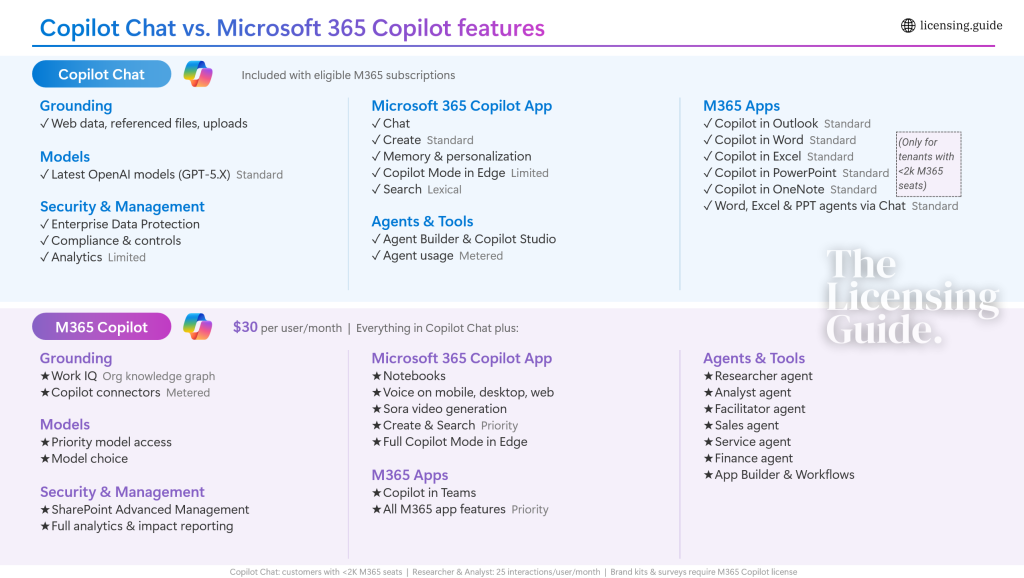
Rather than showing the traditional Microsoft product comparison table where feature names are on the far left and then a column for each SKU in question either has a bullet, doesn’t have it, or has something in between – I personally prefer this stacked approach. It does a better job of visualizing how even the base tier of Copilot Chat offers a wealth of capabilities.
Unfortunately, such AI features in particular are riddled with opaque terminology like “Standard” vs. “Priority”, “Limited” vs. “Full”. All vendors of LLM-based services seem to be playing this game, trying to avoid disclosing any hard numbers or setting binary yes/no rules for the use of their products. In the ever-evolving model capability and AI capacity landscape, it appears to be impossible to express anything with the kind of certainty we had with traditional software and SaaS.
Copilot Chat inside Microsoft 365 Apps… eventually?
Giving too much away without requiring a license upgrade must have been a heated debate around the time when Microsoft made the announcement of how Copilot Chat comes to the Microsoft 365 apps for every worker. Back in September 2025, it sounded like admitting that it makes no sense to have the AI tools available only to 3% of users of apps like Word, Excel and PowerPoint. “Go ahead and use it, then click the upgrade button if you want even more AI power.”
Of course when we’re talking about a software giant the size of Microsoft, nothing is ever quite that simple. Whereas startups of the GenAI era will quickly adjust their commercial offering to drive MAU and ARR metrics to a level needed for the next funding round, in the suite formerly known as Microsoft Office things are a bit more complex to change.
Microsoft had to pause the rollout of Copilot Chat in M365 Apps outside the US shortly after the announcement. The reasons have never been formally disclosed, and neither has the detailed timeline for when and where it actually will be available. As of March 2026, European tenants still seem to lack the advertised capability. Latest decks from Microsoft state “Rollout start to general availability early March 2026 (excluding EU/ UK)” for PowerPoint, with Word it’s just “Current access excludes EU and UK”.
US software vendors not being ready for meeting EU regulations with their LLM-integrated products is not unusual. What is unusual, however, is how Microsoft has decided to walk back from functionality that was already launched for big US enterprise customers. In particular, the way how this has been communicated shows signs of conflict in how Microsoft is reacting to the likes of Claude Cowork and OpenClaw raising expectations of what agentic AI can do with files and apps.
The “Y2K” of Copilot Chat licensing limits
On March 17, 2026, we saw the M365 Message Center message MC1253863 announce: “Starting April 15, 2026, Copilot in Word, Excel, and PowerPoint with advanced reasoning will become generally available. Copilot Chat usage will be governed by standard access to help ensure a reliable experience for all customers”.
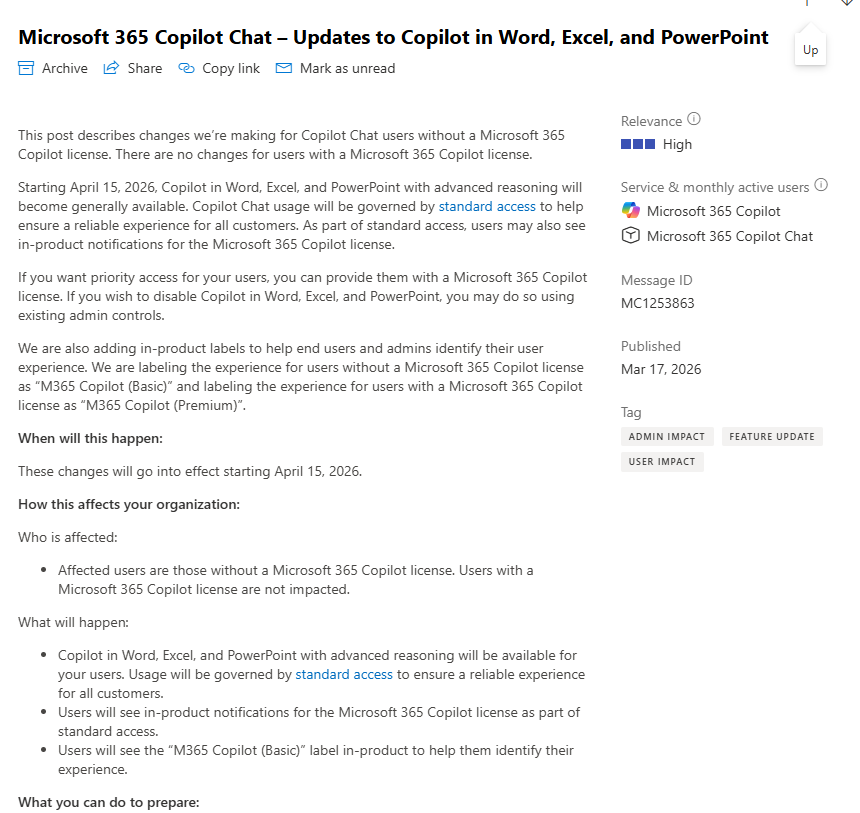
Great, finally it’s official! Except where was that message exactly? Many customers didn’t see it in their tenant. Instead, a different message MC1253858 was visible for the M365 Admin center users. This time, it was the exact opposite messaging:
Starting April 15, 2026, Copilot will no longer be available in Word, Excel, PowerPoint, and OneNote for Copilot Chat users. To ensure a high-quality experience, we are reserving the full Copilot experience in these apps-with advanced reasoning and model choice-for users with a paid Microsoft 365 Copilot license.
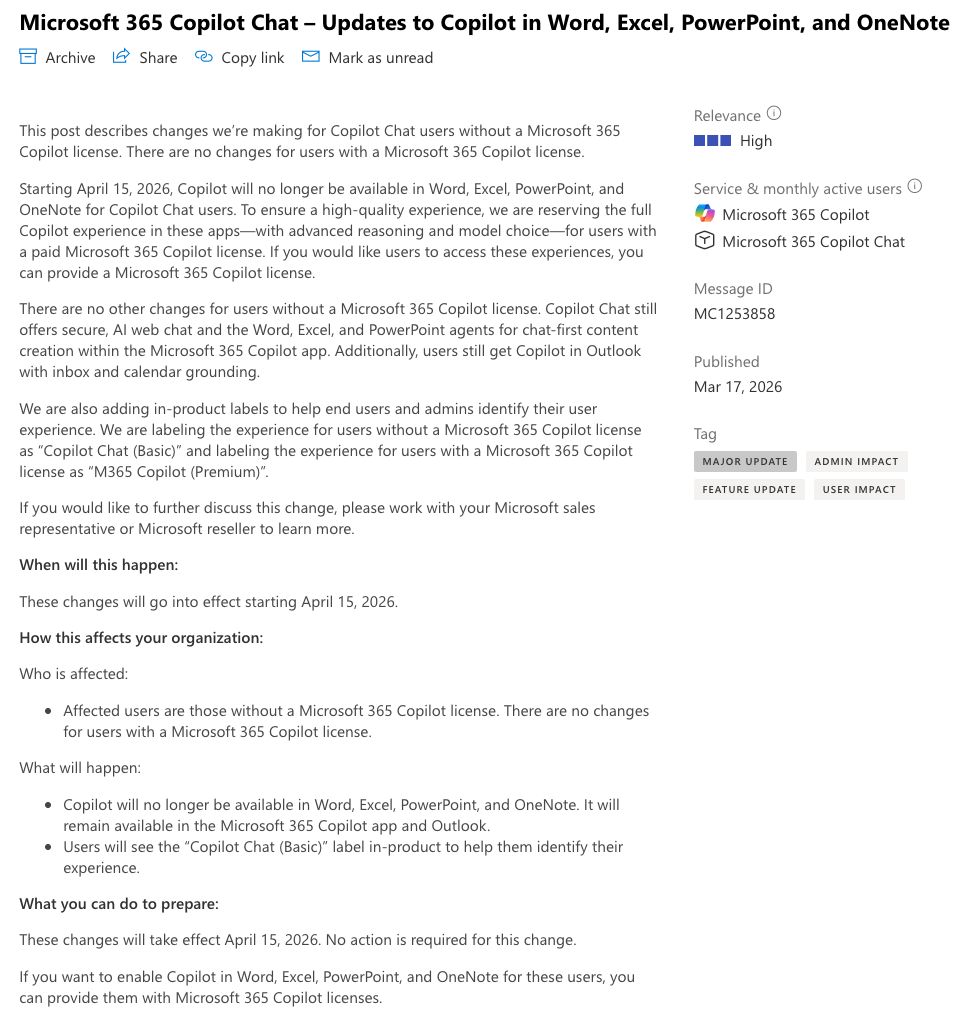
If it wasn’t for community posts on forums and on LinkedIn, customers would have never realized that Microsoft had targeted a different message for different segments. Tenants with less than 2,000 licensed M365 users will get Copilot Chat as promised. Tenants where the M365 seat count goes above 2,000 will not get it without paying for the premium M365 Copilot.
This section’s heading is, of course, a play on the words “Why 2K”. Because one simply cannot look at the newly announced licensing rules and ask the question “why”? What is it about 2,000 seats that determines that a tenant is no longer eligible to use the in-app Copilot Chat for Word, Excel, PowerPoint and OneNote without the paid upgrade?
The logical answer is that Microsoft just had to find a way to make enterprise deals of premium AI licenses easier for their sales teams to negotiate. Especially with the E7 Frontier Worker Suite now on the plate, and with Agent 365 going GA with just half of the promised functionality, the sales pitch had to be solid. No “Standard” vs. “Priority” hesitation, just a clear yes/no switch for the 2k+ seat customers.
Straight Outta Redmond, indeed.