

Customers of Microsoft Dynamics 365 and Power Platform used to have granular control over where their environments were provisioned. For instance, if you created a CRM development environment in France, there were no problems ensuring also the test and production databases landed in France. Soon, that will not be something you can take for granted.
Under Microsoft’s new Power Platform provisioning model, a customer without Advanced Data Residency (ADR) may instead choose only a broad macro region such as EU + EFTA. Microsoft then decides whether the new environment lands in France, Germany, Italy, or another datacenter region inside that boundary.
This change has been announced in the Microsoft 365 admin center message center message MC1444064: “Introduction of Macro Region Geography-Based Environment Provisioning”.
What changes in the Power Platform admin center?
Today, the region picker shown while creating a new environment in PPAC shows individual regions such as France, Germany, Sweden, Italy, Poland, Norway.
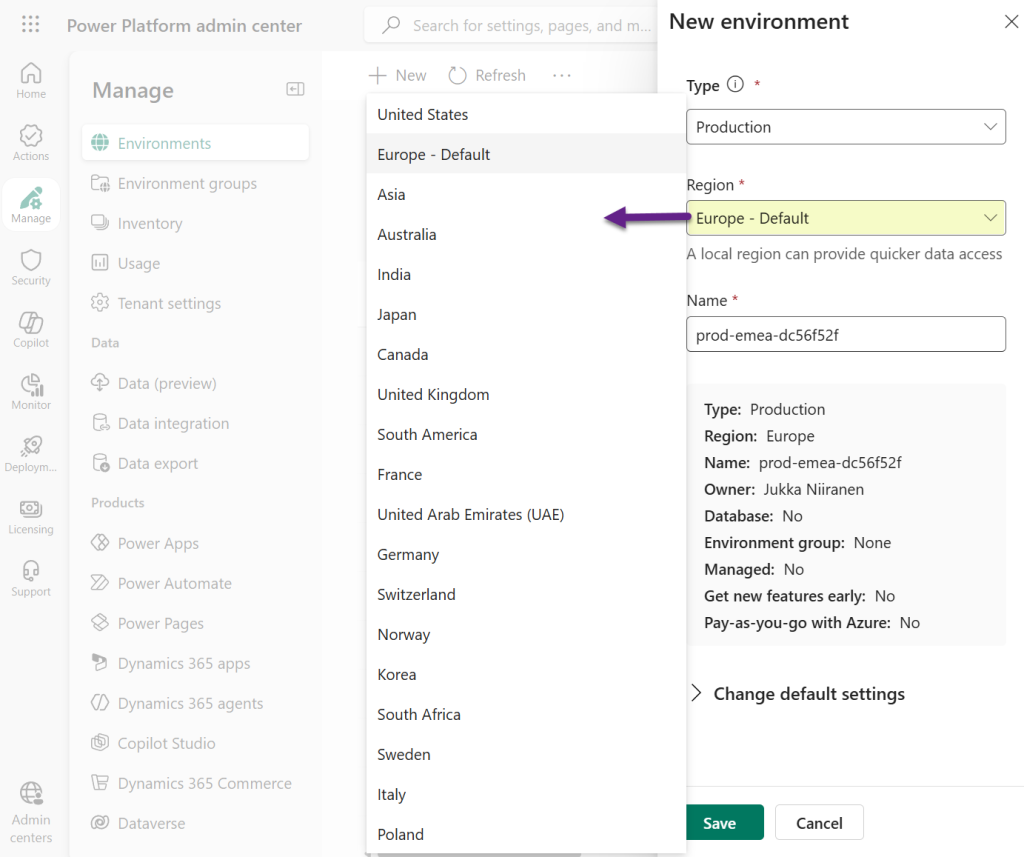
For tenants affected by the new model without ADR, Microsoft says the admin will instead choose a broader macro region geography. Microsoft then assigns the actual datacenter region based on capacity, availability, scale, performance. You will not see the assigned datacenter region until the Power Platform environment has been provisioned.
It’s important to keep in mind that this does not remove the broad data residency commitments Microsoft has made, such as those about preserving European customer data within the region and not pushing it into the United States. For EU Data Boundary requirements, Microsoft says customers should select European Union (EU) and European Free Trade Association (EFTA).
What happesn to existing environments?
Today, and until the macro region geography policy hits your tenant, anyone can place their new Power Platform and Dynamics 365 environments in the above shown regions directly. It is possible that different business applications have been specifically placed in nearby datacenters for customer organizations operating in several European countries, for example.
Microsoft currently says existing environments will retain their selected datacenter region. So an environment created earlier in France is not expected to be automatically moved just because the tenant later loses the ability to choose France for new environments.
According to its documentation, Microsoft’s provisioning algorithm should normally reuse the same datacenter region for subsequent environments in the same tenant and macro region for a foreseeable period. However, capacity or other platform conditions can cause that default to change.
Given the datacenter capacity constraints especially on AI related services, this flexibility is precisely what Microsoft as a company wants to achieve with this policy change. It allows the hyperscaler to better optimize its available resources to those workloads that deliver a better return on its capex investment. For FY2027, the MSFT capex guidance is $175 billion.
What the ADR license purchase unlocks
Microsoft says customers who need to choose a specific Dynamics 365 or Power Platform datacenter region must have Advanced Data Residency enabled for 100% of eligible Microsoft 365 seats in the tenant. Notice how this isn’t tied to the actual user licenses for anything running in the Power Platform environments.
ADR itself is not a new concept. It was announced in a 2022 blog post titled “Microsoft 365 expands data residency commitments and capabilities”. However, up until summer 2026, there has been no connection to the business applications services. MC1444064 appears to be the first time where this prerequisite for Power Platform region selection is now stated.
Macro regions were initially added to the MS Learn documentation page about datacenter regions in a May 2026 update, before being moved to a dedicated new page: “Power Platform and Dynamics 365 macro region geography”. While the documentation describes this as an “enhancement”, in reality it is a reduction in options the customers can choose from.
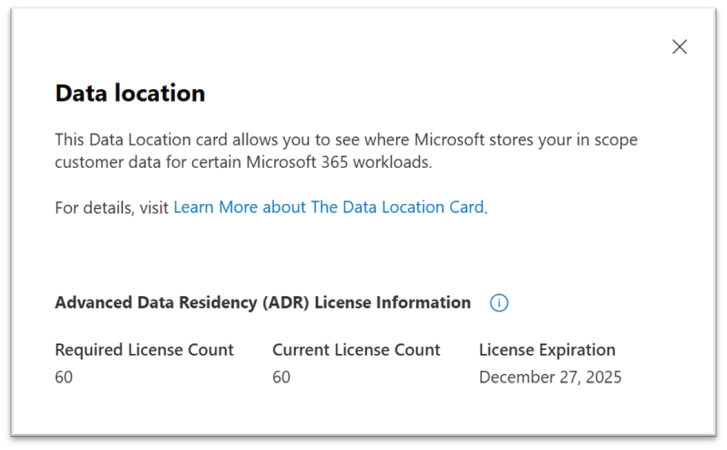
Unless you purchase the Advanced Data Residency add-on. In which case, the current options for selecting a specific datacenter region for the environment will presumably be preserved as-is. Whether your tenant already has this (or if you are even eligible to buy it) can be seen from the Data Location Card in the M365 admin center, under Admin > Settings > Org settings > Organization profile > Data location.
How much will Advanced Data Residency cost?
If you check the online marketplaces offering Microsoft licenses, you will see the price of one ADR add-on seat is roughly €20 per year. Compared to business applications licenses, that doesn’t sound like a lot. The actual cost impact can be significant, though, if you haven’t yet made the Advanced Data Residency commitment on an organizational level.
Because you cannot simply purchase the ADR add-on for the users who need to have their business application in a specific datacenter region, the calculations needs to cover the entire Microsoft 365 user base of the organization. With the above price, a 100 user org would pay €2,000 per year. A 10k user org would pay €200,000 annually. For the privilege of retaining the existing options in Power Platform Admin Center.
If you have compliance requirements going deeper than the EU Data Boundary, you’ll likely already have people in your organization that have explored this topic. If, on the other hand, you are merely building and maintaining Power Apps or Dynamics 365 CRM apps and need to manage the geography where these systems are running, it’s a new licensing angle you now need to be aware of.
Microsoft’s Power Platform macro regions FAQ gives the following guidance:
Plan for the possibility that unforeseen circumstances might place environments created under a broad macro-region geography in different datacenter regions within that macro region. This placement can affect Azure network alignment, VNet integration design, latency expectations, and customer legal review. Consider getting ADR if you require deterministic datacenter region placement.